 GridFlux
Turn a web page into a spreadsheet.
GridFlux is a Chrome extension that finds tables, lists and product grids on a page you open, lets you preview and edit the rows, and exports them. It runs in your browser. There is no account and no cloud scraper.
Add to Chrome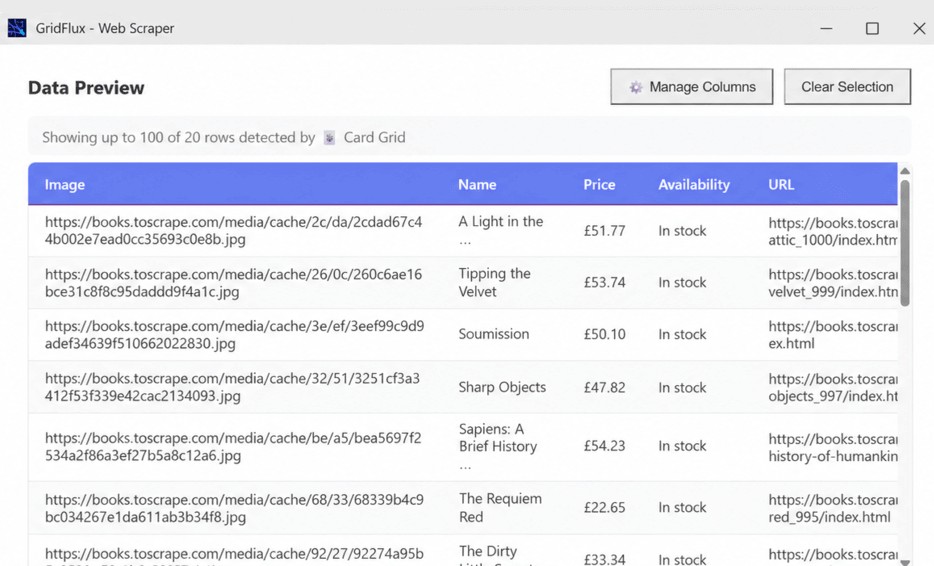
What it does
- Scan a page for tables, lists and product grids, or pick the repeating content yourself.
- Preview the results, rename columns, edit cells, and choose how duplicates are handled.
- Collect more than one page, including sites with Next or Load more buttons.
- Save collections in your browser, pause a run, and come back to it later.
- Export to Excel (.xlsx) or CSV, or copy selected columns into a spreadsheet.
How it works
- Open the page that has the table, list or product grid you want.
- Click Scan Page, or pick a repeating element if you want to choose the data yourself.
- Check the preview, rename headings if you need to, and keep only the columns you want.
- Export to Excel or CSV, or collect further pages into the same dataset.
Questions
Is GridFlux free?
Yes, GridFlux is free to use. There is no account and no sign-up. Extract a single page, or collect many pages into one dataset.
Does my data leave my computer?
Extraction and saved collections stay in your browser. GridFlux does not require an account or a cloud scraping service. If you choose Send feedback, that optional form opens Google Forms in a new tab. See the privacy policy for details.
Will it work on every website?
Results depend on the website’s structure and how it loads data. Some pages need manual selection. Nested scrolling areas are not supported yet, and infinite-scroll collection needs a stable record identifier such as a product URL or item ID. GridFlux does not bypass logins, CAPTCHAs or access restrictions.
What can I export?
Excel files (.xlsx), CSV files, or a copy of selected columns and headers for pasting into a spreadsheet. You can export the full saved dataset, including rows beyond the on-screen preview.
How do I get help?
Visit the support page or email awakeel613@gmail.com.